Build vs buy space management software: floor plans, occupancy data and the lease
Last updated:
9 min read

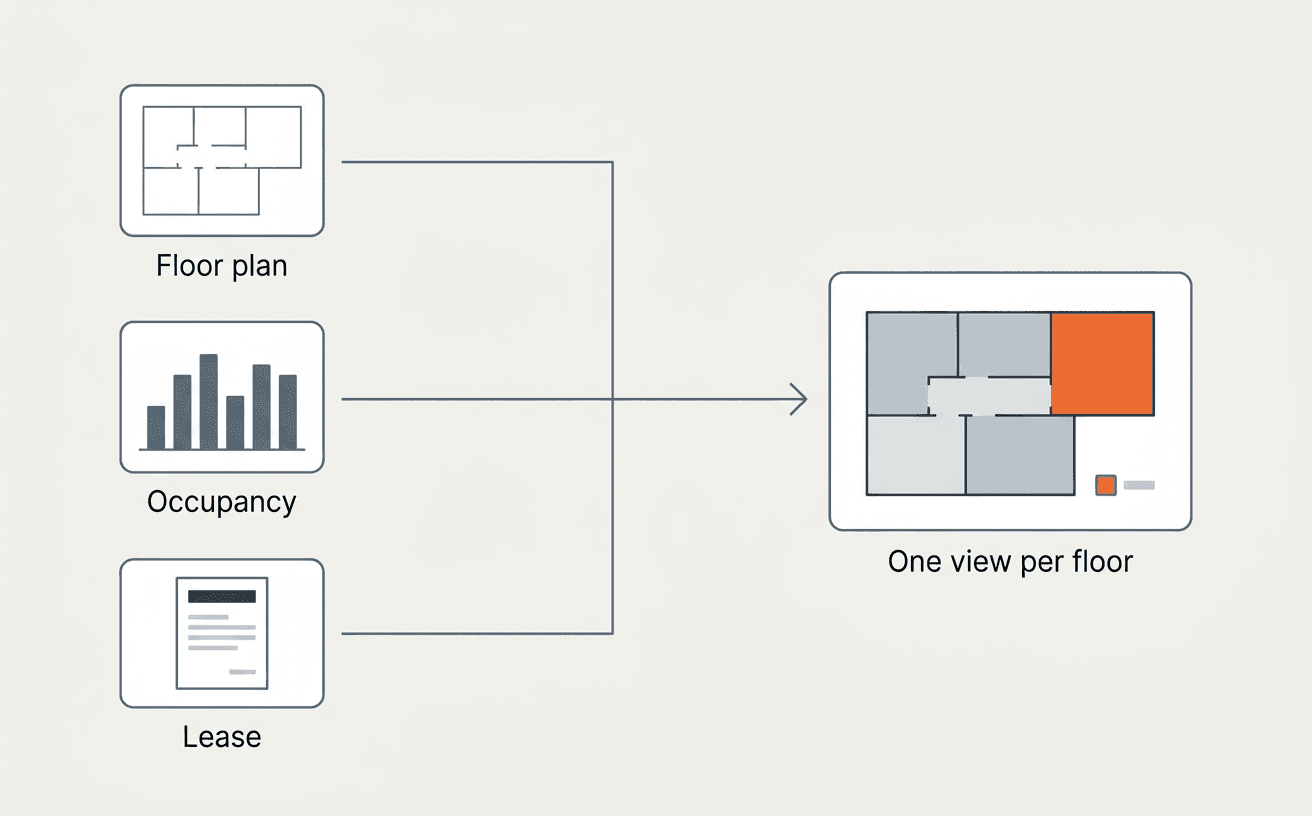
For a portfolio of offices, branches or stores, the best answer is usually the third path: buy the plan reading, occupancy joins and lease link, and keep your own definition of a used seat, your reports and your scenarios on top. If you run one headquarters, building a space utilization dashboard on badge data is a reasonable project. Across a portfolio, the job is joining three records that rarely agree, the floor plan, the occupancy data and the lease, and most of the cost is in keeping them joined.
This piece is part of our series on build vs buy AI agents for corporate real estate. For a broader category explainer, see our guide to space management software.
What does space management software do?
Space management software tracks how much space an organization holds, how that space is used and what it costs, across floors, buildings and sites. It takes in floor plans, occupancy data from badges, sensors and desk or room bookings, HR headcount and space assignments, and connects them to the leases that govern each location. It produces utilization by floor and site, flags underused space, models moves and consolidations, and supports right-sizing decisions at renewal. Space planning software is the closely related tool for laying out a floor or a move; space management covers the ongoing record. For an occupier, the value is the decision the dashboard supports: being able to say, at any site, how much space you pay for, how much you use, and what the lease lets you do about the difference, before the notice window for a renewal or contraction closes.
Why do floor plans, occupancy data and leases rarely agree?
The three records disagree because each was built for a different purpose by a different team, and none of them was designed to match the others.
- The floor plan. A site can have several plan versions on file, and the governing one is not always the newest. Rentable, usable and gross area are measured differently, and the plan your facilities team uses may not be the one your lease references.
- The occupancy data. Badge swipes record entry to a building, not use of a seat. Sensors cover some floors and not others. Bookings show intent, not attendance. HR headcount shows who is assigned to a site, not who comes in.
- The lease. The lease states an area, a measurement basis, rent per square foot and the rights you have to give space back. It was written years ago and amended since.
Join them carelessly and you get confident numbers built on mismatched denominators. Utilization against the wrong area. Cost per seat against a floor you already sublet. A consolidation plan for a site whose lease has no exit until 2031.
What is lease area variance, and why does it matter?
Lease area variance is the difference between the area stated in a lease and the area shown on the governing as-built drawing. It matters because rent, pro rata share and CAM allocations often follow the lease's stated area. When the as-built area differs, someone in lease administration needs to see it, check the lease's measurement clause, and decide whether it changes what you pay or what you can negotiate at renewal. Many leases reference standard floor measurement methods, so a raw measurement off a drawing is not automatically the lease number. A space program that compares the two every year catches variances while there is still time to act on them. Our piece on build vs buy CAD plan intelligence covers how plan data gets read and versioned in the first place.
What is at stake when space data is wrong?
Wrong space data costs you in renewals signed at the wrong size and in consolidation decisions made on numbers nobody can defend. Industry studies show the scale of the underlying data problem. NIST's study of US capital facilities estimated the cost of inadequate interoperability, meaning information that does not move cleanly between systems and teams, at $15.8 billion per year, with owners and operators bearing about two-thirds and roughly 57% falling in the operations and maintenance phase (NIST GCR 04-867). In FMI and PlanGrid's 2018 Construction Disconnected survey of 599 construction leaders, 34.4% named erroneous or outdated data as the primary cause of poor project data (Autodesk summary of FMI/PlanGrid). Both are older, industry-wide figures, so treat them as direction. For an occupier the practical stakes are timing. A floor flagged as underused is worth something when the lease gives you a right to act on it, and that right comes with a notice date. See build vs buy critical date tracking for that side of the problem.
What would you have to build?
Building in-house means building the joins and keeping them current. The charts come last.
| Component | What it involves | What keeps costing money after launch |
|---|---|---|
| Floor plan intake and versioning | Read CAD and PDF plans; identify the governing version per site | Every renovation and new site |
| Area rules | Apply rentable, usable and gross definitions consistently | Measurement standard changes; lease-specific bases |
| Occupancy feeds | Connect badge, sensor and booking systems | Vendor changes; new buildings; API changes |
| Identity matching | Match badge IDs and bookings to HR records and space assignments | Joiners, leavers, reorganizations |
| Data quality rules | Handle tailgating, sensor gaps, no-show bookings, holidays | Ongoing tuning |
| Lease link | Tie each site and floor to its lease, stated area, rent and rights | Every amendment and renewal |
| Utilization model | Define utilization consistently across sites and building types | Business changes in what counts as "used" |
| Scenario modeling | Model moves, consolidations, contractions and subleases | New questions from leadership |
| Permissions | Restrict HR and badge data appropriately | Policy and audit reviews |
| Monitoring and ownership | Catch broken feeds before the quarterly report does | Key-person risk |
The build is a data integration program that happens to end in a dashboard, and the run years cost more than the first release. We work through the run cost in what it costs to build and run your own AI for real estate operations.
When does building make sense?
Building makes sense when the portfolio is small or the question is narrow. Any of these is a fair reason to do it yourself:
- One campus or headquarters. One building, one badge system and one lease is a manageable join.
- The data already sits in a warehouse. If your data team already lands badge, booking and HR data in one place, a utilization view on top is a modest project.
- A narrow question. If leadership wants weekly attendance by floor and nothing more, build that.
- A pilot. Building a small version first teaches you which questions matter before you buy.
A home-built dashboard is strongest on attendance. Connecting the result to the floor plan's governing area and to the lease's rights and dates is a larger project, so scope it explicitly before you start.
What is the third path?
The third path is to buy the plan reading, occupancy joins and lease link, then run your own reports and scenarios on top. Reading drawings, versioning them, joining badge data to HR records and tying every floor to its lease is generic work. How your company defines a used seat, which sites are strategic and how you present scenarios to the executive team are your rules.
Ask any vendor who builds those workflows. Some expect your team to build them on their platform, which brings part of the run cost back in house. With REAL, you define the rules and REAL's engineers build and maintain the workflow on the shared record.
REAL's space optimization agents connect floor plans, badge and sensor occupancy, desk and room booking, HR headcount, lease and space assignments, and existing IWMS records into one occupancy view, with agents for utilization, occupancy management, moves, capacity forecasting and portfolio optimization. The space and asset data agent reads bid sets, permit sets, as-builts and site photos, identifies the governing drawing version, and extracts areas, schedules and equipment counts cited to the sheet. The action that follows is specific: a variance between lease-stated area and as-built area goes to lease administration with the sheet and clause attached, and an underused floor is flagged next to the lease right and notice date that would let you act on it. Your own utilization rules and reports run as custom workflows on the same record.
Decision scorecard: build, buy, or buy and build on top
| Criterion | Build | Buy | Buy + build on top |
|---|---|---|---|
| Time to first portfolio view | Months | Weeks | Weeks |
| Reads floor plans and governing versions | You build it | Ask the vendor to prove it | Included |
| Joins badge, sensor, booking and HR data | You build and maintain each feed | Included, varies by vendor | Included |
| Ties each floor to the lease's area and rights | Rarely in scope | Varies | Included |
| Fit to your definition of utilization | Exact | Varies | Exact |
| Who builds your custom reports and rules | Your team | Limited to configuration | With REAL, REAL's engineers, to your rules |
| Ongoing cost | Rises with each site and feed | Predictable | Predictable |
| Key-person risk | High | Low | Low |
Questions to ask before you decide
- How many sites, and how many badge, sensor and booking systems, are in scope?
- For each site, do we know which floor plan governs and what area the lease states?
- Who defines "utilized" for our company, and is it the same across offices and branches?
- Which leases have contraction, termination or sublease rights in the next 24 months?
- Can every utilization figure be traced to its data source and every area figure to a drawing sheet?
- Who maintains the feeds, and our custom reports, when a building changes its badge vendor?
Space data pays off when it reaches a lease decision in time. For the decision side, see when to consolidate a location. The third path gets you there with your rules on top and the joins maintained for you.
FAQ
Is space management software the same as an IWMS?
- No. An IWMS (integrated workplace management system) usually bundles lease administration, maintenance, capital projects and space into one suite. Space management software focuses on space: plans, occupancy, assignments and moves. Many occupiers run space management as an IWMS module or as a separate tool that reads from the IWMS.
How accurate is badge data for measuring utilization?
- Badge data measures entry to a building or floor, not use of a desk or room. It misses tailgating and counts people who badge in and leave. Combining it with sensors and booking data gives a better picture, as long as you know where each source has gaps.
Do we need to re-measure every site?
- Not usually. Start by comparing the lease's stated area with the governing as-built drawing for each site. Re-measure only where the variance is material under the lease's measurement clause or where no reliable drawing exists.
What is the difference between space management and space planning software?
- Space planning software is used to lay out a floor, a stack or a move. Space management software maintains the ongoing record of space, occupancy and cost across the portfolio. Most occupiers need planning for projects and management for decisions.
More From Our Blog
More
Knowing when to consolidate a location
Reading portfolio performance in real time so the call to invest, hold, or exit is grounded in evidence.

What is space management software, and how does it connect to occupancy cost
Booking a room and measuring how it is actually used are two different questions. Neither means anything for a portfolio decision until it is tied to cost.

What is site selection software, and why one-time studies are losing ground
A market that looks open on paper often is not. Site selection software scores candidate locations continuously instead of once, before a lease gets signed.

Initial agents live in two weeks.
Start with one or two high-value workflows, connect the required data and documents, measure the result, then expand across domains.
- A tailored onboarding for every enterprise.
- Fitted to how you actually work.
- Continuous support as your portfolio evolves.